Mobile Setup Upgrade
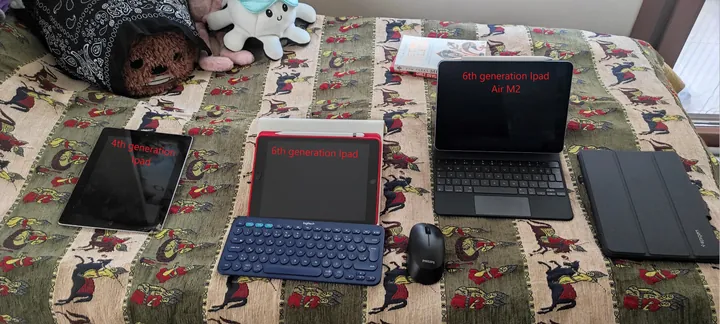
In the early 2010s, I had the chance to get an iPad. Back then, mobile phones were still pretty basic, and the iPad’s larger screen felt like a game changer. I thought it could serve as a portable workspace, so I bought the LTE version along with a SIM card, which made it easy to use anywhere I went. By 2018, I wanted to move away from using traditional pen and paper and instead use a more streamlined, digital approach for taking notes. My goal was to bring together all my scattered class notes and replace heavy textbooks with one portable device. The iPad, paired with an Apple Pencil, seemed like the perfect solution. At first, I was worried about latency issues when writing, but those concerns were mostly unfounded because the latency was hardly noticeable. This setup made studying a lot easier, especially for taking visual notes during lectures that involved complex diagrams, which would have taken much more effort using traditional methods. Later, I decided to enhance my setup by adding a Logitech keyboard and a Microsoft Bluetooth mouse, hoping to create a lightweight and flexible mobile workspace. However, this setup didn’t meet my expectations due to battery life issues, limited multitasking, and the lack of some important apps, like full-featured graphic design software and advanced productivity tools. Despite these shortcomings, the experience gave me valuable insights. I had been thinking about upgrading for a while, and three days ago, I finally did it. I upgraded to the iPad Air 6th Generation with the M2 chip, along with the Pencil Pro and Magic Keyboard. I also bought a Spigen case, which, although a bit pricey, has turned out to be a good investment. Both the Magic Keyboard and the Spigen case are high-quality and very useful. With the M2 chip’s enhanced processing power, improved battery life, and better multitasking, I think this setup finally meets my vision of an effective mobile workspace. The Pencil Pro charges magnetically and stays securely attached to the iPad, which means I don’t need a special case just to carry the pen. After three days of using this setup, I already really like it. For handwritten notes, I use Notability; for drawing, I use Procreate; and for organizing my digital life, I use Notion as my “second brain.” As I keep using this setup, I’ll share more of my thoughts